Context
During my seventh-grade science student teaching, I used the Build a Molecule simulation (PhET Interactive Simulations, n.d.) to help students connect chemical formulas with molecular models. Students first explored the simulation before formal explanations of molecules and compounds. In a later lesson, they built assigned molecules and recorded two-dimensional drawings and names.
Instructional Materials
Activity worksheet: Models → Chemical Formulas → Models
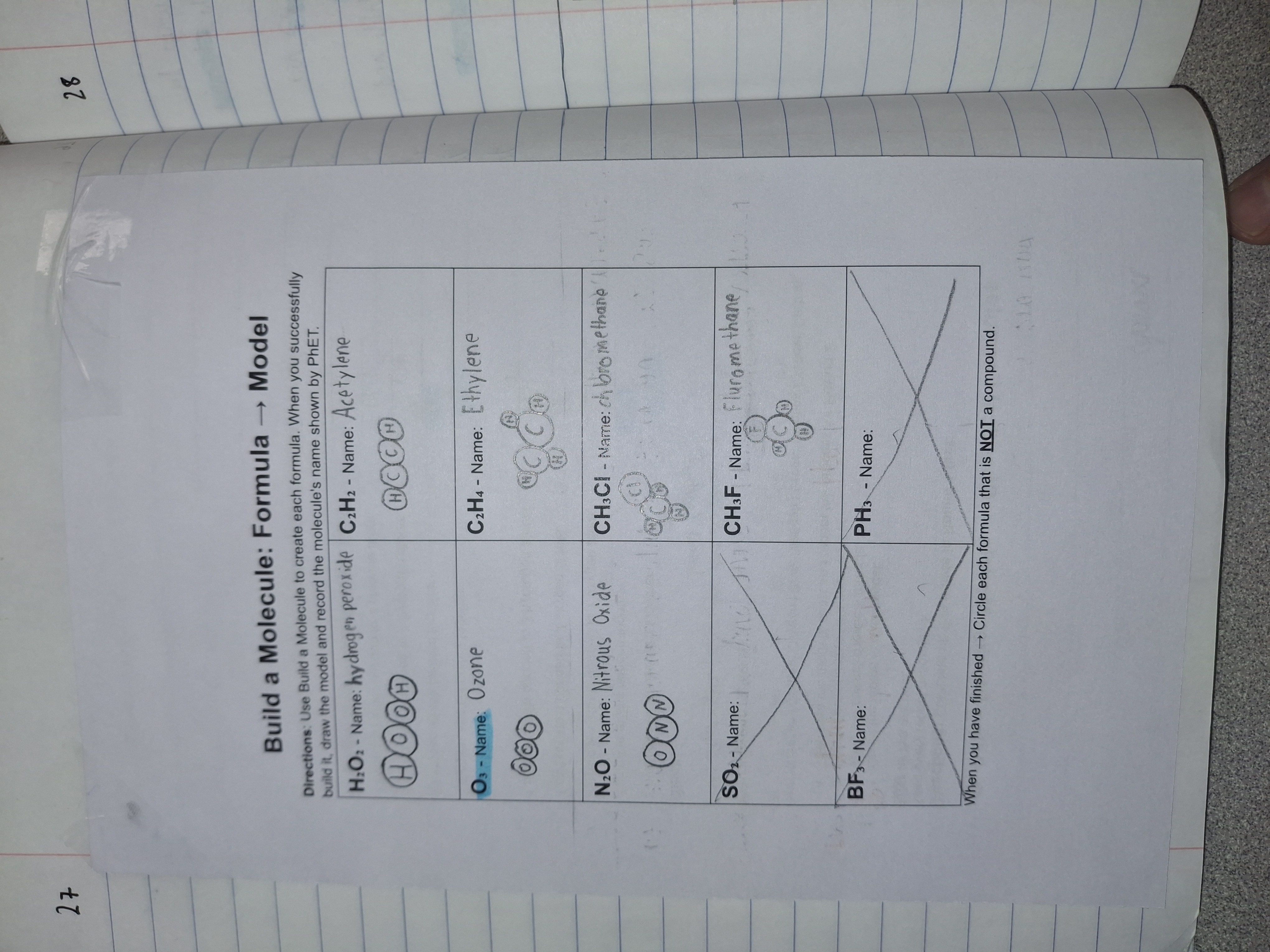
The PhET section asked students to build each given formula, draw its model, record its name, and identify formulas that were not compounds. The physical building-block section provided related practice translating models into formulas.
Simulation: PhET Build a Molecule
The worksheet originally listed ten formulas. During instruction, I withdrew SO₂, BF₃, and PH₃ because students could not build them in the simulation setup we used. The completed example preserves these crossed-out items and the seven remaining responses.
Student Evidence — Formula to Model
This student recorded seven molecular models and names. For example, H₂O₂ is represented by two hydrogen and two oxygen atoms, and C₂H₄ by two carbon and four hydrogen atoms. O₃ is highlighted in response to identifying a substance that is not a compound. The three crossed-out items were withdrawn by my instructions during the task.
Competency and effect on learning
This artifact demonstrates how I used educational technology to engage students in connecting chemical formulas with molecular models. In an earlier lesson, students used the simulation’s playground mode to experiment with combining different elements. This provided an opportunity for exploration and sense-making before I explained molecules and compounds, while also familiarizing students with the interface.
When students returned to the simulation for the drawing task, they could access and use it easily, and I observed no difficulties with the technology itself. They used given formulas to build molecules, then recorded their models and names. This required students to apply their understanding of element symbols and subscripts to a visual representation rather than only read or copy a formula.
Although students had practiced reading subscripts, the concept was still relatively new and some initially struggled. As I circulated, I could compare their models and drawings with the formulas and guide them to check and redraw as needed. The completed example shows a student representing H₂O₂ with two hydrogen and two oxygen atoms and C₂H₄ with two carbon and four hydrogen atoms. The student also highlighted O₃ when identifying a substance that was not a compound. These responses provide evidence of translating formulas into models and distinguishing an elemental molecule from compounds. The simulation and recorded drawings also made students’ thinking visible so I could provide feedback during the activity.
Modifications for future use
Although the earlier exploration prepared students to use the interface, I had not modeled the complete process of building a molecule and drawing it on the worksheet. The worksheet layout and visual directions were also not clear enough. Some students wrote only the molecule’s name, while others drew the three-dimensional model available through the simulation’s additional information instead of the required two-dimensional model. These responses showed that I needed to clarify the expected product, even though students could operate the technology.
Before future use, I would demonstrate one complete example: interpret the formula, count each type of atom, build the molecule, draw a simple two-dimensional model, and record its name. I would revise each response box to include clearly labeled spaces for the drawing and name, with a small completed example showing the expected format. I would also check students’ first response before they continued independently so I could address missing drawings or subscript errors early.
I would test every assigned formula in the exact simulation mode and atom kits students would use. Three of the ten original tasks could not be completed in our setup, so I had to withdraw them during the lesson. I would remove or replace those items before distributing the worksheet. These changes would preserve the useful exploration and practice while making the instructions clearer and ensuring that students could complete every assigned task.
References
PhET Interactive Simulations. (n.d.). Build a molecule [Interactive simulation]. University of Colorado Boulder. https://phet.colorado.edu/sims/html/build-a-molecule/latest/build-a-molecule_all.html
All portfolio references →Next: Family Communication →